
Your Leads Are Dying While You Check Your Inbox
Here’s a number that should keep every sales leader awake at night: the average B2B company takes 42 hours to respond to a new lead. Meanwhile, research from Lead Connect shows that 78% of customers buy from the company that responds first.
Not the cheapest. Not the most established. The fastest.
If someone fills out your contact form at 2pm on a Tuesday and doesn’t hear back until Thursday morning, you’ve already lost. They filled out three other forms that same afternoon, and your competitor who responded in 5 minutes already has a call scheduled.
This guide walks you through the complete lead response automation system we built and run at efficiency360.tech — the one that contacts every new lead in under 90 seconds. Not 90 minutes. Seconds. We’ll cover the architecture, the exact Make (Integromat) scenario we deployed, the email strategy, the scheduling approach, and the real metrics we tracked.
And here’s what makes this different from other “how-to” posts: you can try the live system yourself on our website and watch it execute in real time.
Why Lead Response Time Is the Highest-ROI Automation You Can Build
Before we get into the technical build, let’s talk about why this specific automation delivers outsized returns compared to almost anything else you could automate.
Speed-to-lead directly impacts revenue. A study from InsideSales.com found that contacting a lead within 5 minutes makes you 100x more likely to connect compared to waiting 30 minutes. Not 2x. Not 10x. One hundred times more likely.
The math is simple: if your website generates 50 leads per month, and you’re currently converting 5% of them into calls, improving your response time from hours to seconds could realistically double or triple your conversion rate. That’s the difference between 2–3 booked calls and 5–8 booked calls per month — from the same traffic, the same budget, the same team.
And unlike most automation projects, this one is fast to implement. We had ours working in two days. Here’s exactly how.
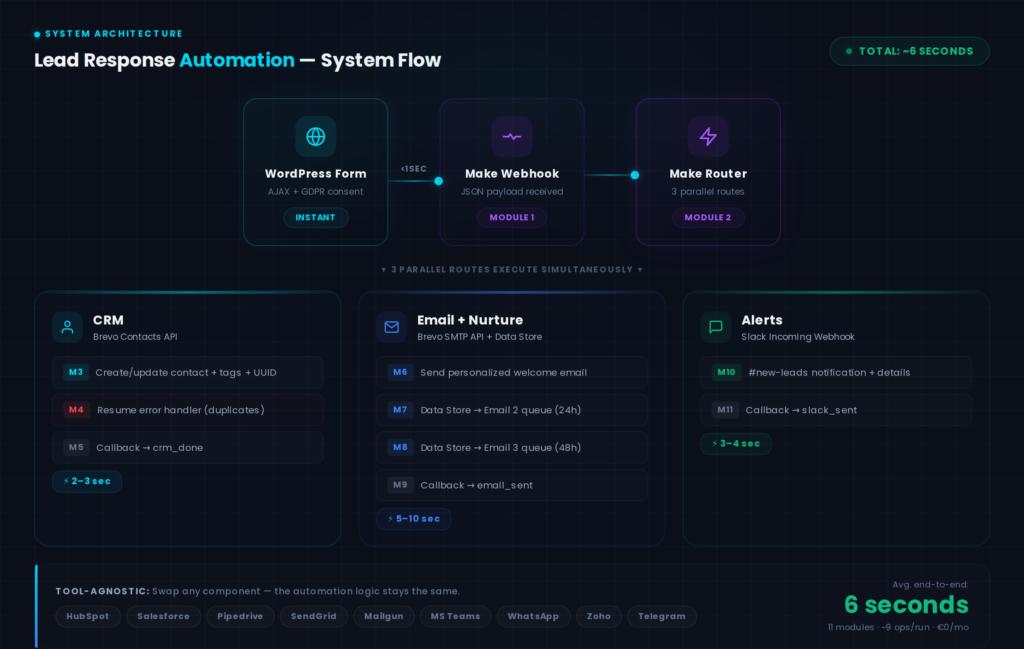
The System Architecture: 11 Modules, 3 Parallel Routes, ~6 Seconds
The system has four layers. A website form captures the lead. A webhook fires the data to Make. Make orchestrates everything in parallel. Status callbacks report progress back to the website in real time.
Here’s the exact flow we built:
Layer 1 — WordPress Form. A custom-built form (no plugins — just clean HTML, vanilla JavaScript, and a PHP AJAX handler) collects the lead’s first name, email, phone number, company, and automation interest area. On submit, JavaScript generates a unique UUID, bundles the form data with a callback URL and security nonce, and sends it to WordPress via AJAX. WordPress validates, sanitizes, and forwards the payload to Make via wp_remote_post(). The webhook URL never touches the browser — it stays server-side.
Layer 2 — Make Webhook + Router. Module 1 is a Custom Webhook that receives the JSON payload. Module 2 is a Router that splits the data into three parallel routes. All three routes fire simultaneously — this is what makes a 6-second total execution possible.
Layer 3 — Three Parallel Routes.
Route 1 — CRM (Modules 3, 4, 5): An HTTP module calls the Brevo Contacts API to create or update a contact record. The payload includes the lead’s name, email, company, interest area, lead source tag (demo-lead-response), and a tracking UUID. The updateEnabled: true flag means returning leads get their data updated, not duplicated. A Resume error handler (Module 4) catches any API errors — duplicate contacts, rate limits, malformed data — so the scenario keeps running. Module 5 fires a callback to WordPress: step: crm_done.
Route 2 — Email + Nurture Sequence (Modules 6, 7, 8, 9): Module 6 calls the Brevo Transactional Email API to send a personalized welcome email. It uses the lead’s first name, references their interest area, and includes a “Book a Discovery Call” CTA. This email arrives within 5–10 seconds of form submission. Modules 7 and 8 are Data Store operations that queue the follow-up emails: Email 2 (send_at: now + 24 hours) with a relevant blog resource, and Email 3 (send_at: now + 48 hours) with a case study and final booking CTA. Each record stores the lead’s UUID, email, name, company, interest, email number, scheduled time, and a “pending” status. Module 9 fires the callback: step: email_sent,sequence_scheduled.
Route 3 — Team Notification (Modules 10, 11): Module 10 sends a formatted JSON payload to a Slack incoming webhook. Our #new-leads channel gets a message with the lead’s name, email, company, interest, submission time, and UUID. Module 11 fires the final callback: step: slack_sent.
Layer 4 — Real-Time Progress Tracker. On the WordPress side, the form is replaced by an animated progress tracker the moment the user submits. JavaScript polls a status endpoint every 2 seconds via AJAX. As each callback arrives from Make, the corresponding step lights up with a checkmark: “CRM record created ✓”, “Personalized email sent ✓”, “Follow-up sequence scheduled ✓”, “Sales team notified ✓”. The visitor watches the entire automation execute live.
Total modules: 11. Total operations per submission: ~9. Total execution time: ~6 seconds. Total monthly cost: €0.
Why We Use Brevo — And Why It Doesn’t Matter Which Tools You Pick
We use Brevo (formerly Sendinblue) for both CRM and transactional email. One platform, one API key, one contact database. The Contacts API handles CRM record creation with custom attributes and list management. The Transactional Email API handles the immediate welcome email with full HTML templates, merge fields, and delivery tracking. This simplicity was deliberate — fewer integrations means fewer failure points.
But here’s the important part: the architecture is completely tool-agnostic.
The Make scenario doesn’t care what CRM or email provider sits behind each HTTP module. The routing logic, the parallel execution, the error handling, the callback mechanism, and the Data Store scheduling — all of that stays exactly the same regardless of which tools you plug in.
CRM alternatives: HubSpot (free tier), Salesforce, Pipedrive, Zoho CRM, Monday CRM, Airtable, Notion databases — any system with a REST API or a native Make module.
Email alternatives: SendGrid, Mailgun, Amazon SES, Postmark, HubSpot Email, Mailchimp Transactional — any transactional email provider.
Notification alternatives: Microsoft Teams, Discord, Google Chat, WhatsApp Business API, Telegram, even plain SMS via Twilio — any messaging platform with a webhook or API endpoint.
When we build this for clients, the first question is always: “What do you already use?” We never force a platform switch. The automation wraps around your existing stack.
The Data Store Trick: How We Schedule Follow-Ups Without Holding a Scenario Open
This is the most underappreciated part of the build, and it’s worth explaining because it solves a real problem.
The naive approach to a 3-email sequence in Make would be: send Email 1, add a 24-hour Delay module, send Email 2, add another 24-hour Delay, send Email 3. The problem? That keeps a single scenario execution open for 48 hours. It ties up a Make scenario slot the entire time, it’s fragile (if Make has an outage during those 48 hours, the whole sequence fails), and it burns through operations inefficiently.
Our approach is different. The main scenario sends Email 1 immediately, then writes two records to a Make Data Store — essentially a simple database table built into Make. Each record contains everything needed to send the follow-up email: the lead’s details, the email number (2 or 3), a scheduled send_at timestamp (24h and 48h from now), and a status of “pending.”
A separate, lightweight Make scenario runs on a schedule (every 15 minutes). It searches the Data Store for records where status = pending and send_at <= now, sends the email, and updates the status to “sent.” This is the same pattern that production email platforms use internally — a queue with scheduled processing.
The benefits: the main scenario completes in 6 seconds, not 48 hours. Each follow-up email is independently retryable if something fails. The scheduling scenario is simple and stateless. And you can easily add Email 4, 5, or 6 just by adding more Data Store records — no changes to the main scenario.
The WordPress Side: Custom Form + AJAX + Webhook
On the WordPress side, you need three things: a clean form, an AJAX handler, and status tracking.
The form is custom HTML — no WPForms, no Gravity Forms, no Contact Form 7. Fields for first name, email, phone (optional), company (optional), a dropdown for “What would you like to automate?” (with options like Lead Follow-Up, Client Onboarding, Reporting, Invoicing, Other), and a GDPR consent checkbox. Style it to match your brand.
The AJAX handler lives in your theme’s functions.php or a dedicated include file. When the form submits, JavaScript sends a FormData payload to WordPress via wp_ajax / wp_ajax_nopriv. The PHP handler verifies the nonce, sanitizes every field, generates the callback nonce, and forwards the data to Make via wp_remote_post(). This two-step approach (browser → WordPress → Make) is critical for security: your Make webhook URL stays in server-side code, never exposed to the client.
Spam protection uses two layers: a honeypot field (a hidden input that bots fill but humans don’t see) and rate limiting via WordPress transients (maximum 3 submissions per email address per 24 hours, plus per-IP limits). No CAPTCHA needed — honeypots catch 95%+ of spam without touching the user experience.
Status tracking uses WordPress transients keyed by the submission UUID. Each callback from Make updates the transient with the completed step. A polling endpoint returns the current progress as JSON. Transients auto-expire after 1 hour — no stale data accumulating in your database.
Email Templates That Convert
The email sequence is where the magic happens for the lead. Here’s the three-email structure we run:
Email 1 — Immediate (5–10 seconds after submission). Subject: “[First Name], you just experienced sub-90-second lead response.” This email acknowledges their submission, names exactly what happened in the background (CRM record, email, team notification, follow-up sequence), and makes a single clear ask: “Book a 15-minute discovery call.” The P.S. line drives the point home: “This email was sent automatically in under 60 seconds. It runs 24/7, weekends included, and never forgets a lead.”
Email 2 — 24 hours later. Subject: “The automation guide your team needs to read.” This email provides genuine value — a link to a relevant blog post based on their interest selection. If they selected “Lead Follow-Up,” link to this guide. If they selected “Client Onboarding,” link to an onboarding automation post. The CTA is soft: “Found this helpful? Reply and tell us about your specific situation.”
Email 3 — 48 hours later. Subject: “How we cut lead response from 6 hours to 90 seconds — the full case study.” This email shares the case study and makes the final push to book a call. The CTA is direct: “We built this for ourselves. Now let’s build it for you.”
Email deliverability tip: New sending domains start with zero reputation. Your first emails may land in spam. To fix this: authenticate your domain with SPF, DKIM, and DMARC records. Start with simplified, text-heavy HTML (not heavy branded templates). Send test emails to yourself across Gmail, Outlook, and Yahoo — open them, reply, mark as “not spam.” Sender reputation builds over 5–10 days of consistent, engaged sending. Only switch to your full branded template once deliverability is established.
Measuring Everything: The Metrics That Matter
One of the smartest things about building this system for yourself is that it generates your first case study automatically. Here’s exactly what to track from day one:
Response time — the seconds between form submission and email delivery. The timestamp at submission comes from JavaScript; the email confirmation comes from Brevo’s API response. Target: under 90 seconds.
Scenario execution time — how long Make takes to complete all 11 modules. Visible in Make’s execution logs. Our average: ~6 seconds per run.
Email delivery rate — what percentage of emails arrive successfully (not bounced, not deferred). Track via Brevo’s transactional email dashboard. Target: 95%+.
Email open rate — how many leads open the welcome email. Immediate delivery timing pushes this well above industry averages. Target: 60%+ (B2B industry average: ~20%).
Click-through rate — how many leads click the “Book a Call” CTA. Target: 8–12%.
Call booking rate — the ultimate metric. What percentage of form submissions become scheduled calls? This is where the ROI story lives. Even a 2x improvement is a compelling case study.
Time saved per lead — how many minutes did the manual process take per lead? (Checking the form, copying to CRM, writing an email, sending it, notifying the team.) Multiply by monthly lead volume for total hours recovered.
Data Store queue health — monitor the follow-up scenario’s execution logs to ensure pending records are being processed on time. Any records stuck in “pending” past their send_at time indicate a scheduling issue.
Collect these metrics for a minimum of 30 days or 50 submissions before publishing your case study. Real numbers beat projections every time.
Common Mistakes to Avoid
After building these systems for ourselves and for clients, here are the traps we see most often:
Don’t skip the CRM step. It’s tempting to just send the email and call it done. But without CRM integration, you have no history, no contact record, no way to track the lead’s journey. Every lead should exist in your CRM from second one.
Don’t use your personal email as the sender. Use a dedicated address like hello@ or team@ with proper SPF, DKIM, and DMARC authentication. New domains need reputation warming — simplified HTML templates first, branded templates once you’re landing in primary inboxes.
Don’t forget error handling. Our scenario has a Resume error handler on the CRM module specifically because Brevo’s Contacts API throws duplicate-contact errors during testing. Without it, one API hiccup kills the entire run. Add error handlers to every critical module, and consider a catch-all Slack alert on scenario failure.
Don’t hold scenarios open for delays. Use the Data Store scheduling approach for any email sequence longer than a few minutes. Built-in Delay modules tie up scenario slots and are fragile across long time spans.
Don’t over-automate the follow-up. Three emails over 48 hours is the sweet spot. More than that and you’re annoying leads, not nurturing them. If they don’t convert after Email 3, add them to your general newsletter list and move on.
Don’t hardcode webhook URLs in templates. Store them in WordPress options or Customizer settings. If you ever rotate a webhook URL, you want to change it in one place — not hunt through template files.
What This Costs
One of the best things about this automation: the entire stack starts at zero cost.
Make offers a free tier with 1,000 operations per month — enough for roughly 100 lead submissions (at ~9 operations each) before you need to upgrade ($9/month for 10,000 operations). Brevo’s free tier covers 300 emails per day and unlimited contacts — more than enough for most B2B lead volumes. Slack is free. WordPress you already have.
Total cost to start: €0. Total cost at scale (500+ leads/month): roughly €30–50/month in platform fees. Compare that to the revenue from even one additional closed deal per month and the ROI is astronomical.
And because the architecture is tool-agnostic, you can swap any component as you scale. Start with Brevo’s free CRM, migrate to HubSpot or Salesforce when your team outgrows it. Start with Slack notifications, add WhatsApp Business API when your team needs mobile-first alerts. The Make scenario adapts — you just swap the API endpoint in the relevant module.
Try It Yourself — Live, Right Now
Most automation guides end with “take our word for it.” We end with proof.
Visit our interactive demo → Fill out the form, and watch the system execute in real time. You’ll see your CRM record get created, your personalized email arrive, and your notification fire — all in under 90 seconds. Then check your inbox. The email you received was sent by the exact scenario described in this post.
If you’d rather have experts build, test, and optimize this for your team — with guaranteed sub-90-second response times and a done-for-you implementation using whatever CRM, email platform, and messaging tools your team already relies on — book a free automation audit and we’ll show you exactly what’s possible.
